Pro Features
Overview
The Pro add-on installs alongside the Free plugin and unlocks premium behaviour. It is a pure add-on — deactivate it and the Free plugin keeps working exactly as before, with your campaigns and waitlist untouched.
Pro requires the Free plugin to be installed and active. A licence key enables automatic updates; the features themselves work as soon as the add-on is active.
Deposits & Partial Payments
Let customers pay a percentage or fixed deposit now and record the remaining balance on the order. You can offer a full/partial choice or require partial payment. The product page and cart show the choice and the amounts due.
See Partial Payments for setup, storefront and cart examples, and how to record the balance after collecting it.
Tax is calculated on the full order at deposit time, and the balance is collected manually via the order action. Automatic off-session charging of the balance is not included in this release.
Preorder Pricing
On a Preorder campaign's Content tab, set a percentage or fixed Preorder discount. The product page shows the lower price beside a strikethrough regular price. The discount applies only while the product is in preorder mode, so it does not change the price of an in-stock product outside the campaign. Set the expected Shipping & fulfilment date here if you want a countdown to shipment.
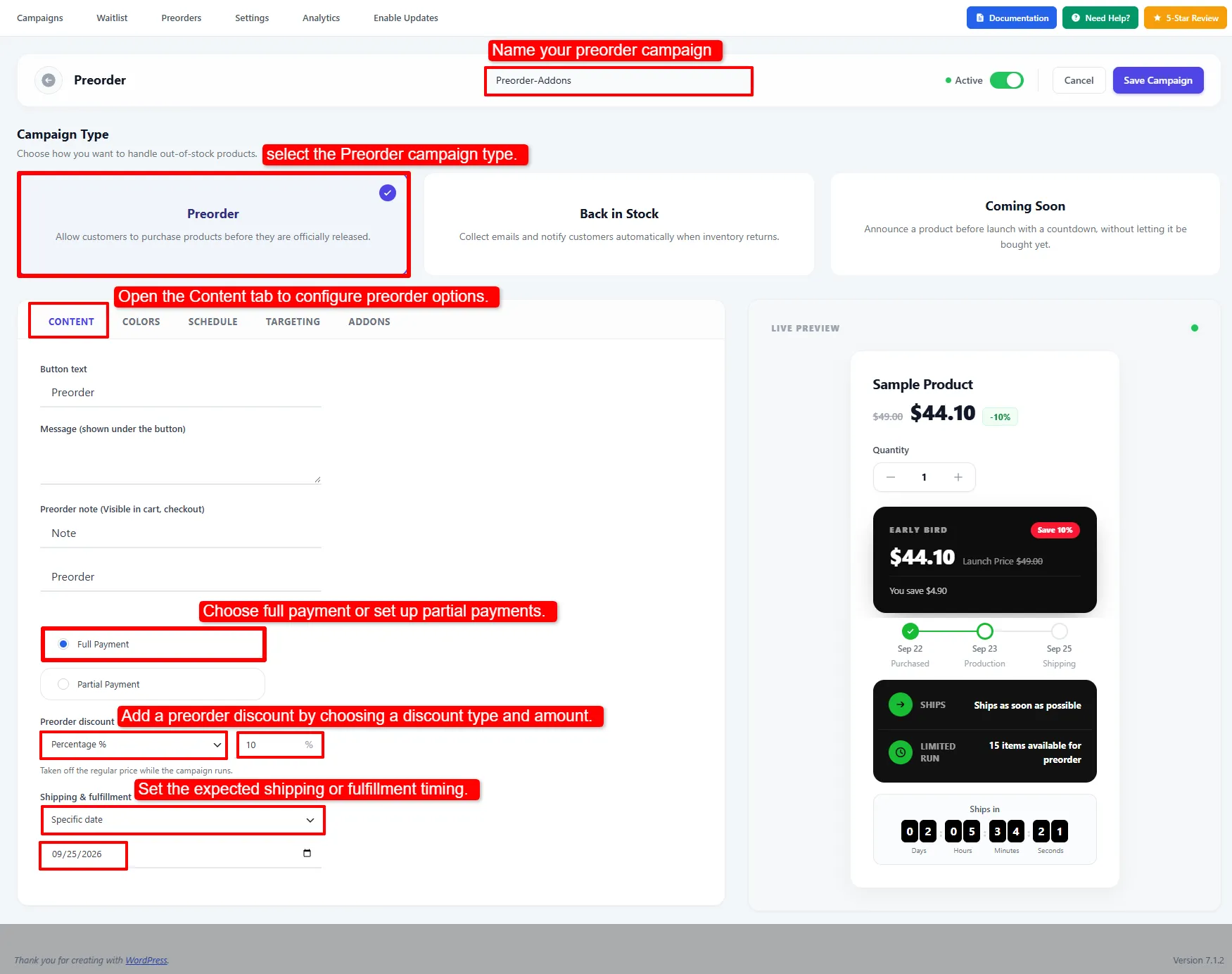
The example sets a 10% preorder discount and a specific shipping date before configuring widgets.
On the Targeting tab, you can also close preorders after a set number per product — see Stop taking preorders after a set number. Save the campaign after choosing its target products and availability rule.
Early Bird Pricing
A Launch Price vs Early Bird comparison card can appear near the Preorder button. It appears only when the preorder price is lower than the regular price; set a Preorder discount or sale price first. The Addons tab lets you edit its labels, colours, discount badge, and product-page position.
Preorder Widgets
Open the campaign's Addons tab to enable storefront widgets for targeted preorder products. Each widget has its own switch and settings panel:
- Early Bird Pricing — the two-card price comparison
- Countdown timer to the ship date
- Progress bar / timeline (Purchased → Production → Shipping)
- Info panel (Ships / Pay now / Limited run) with
{stock},{price},{deposit}and{ship_date}tokens
Back in Stock campaigns show a reduced Addons list: Restock Info Panel and Restock Countdown. The current Back in Stock editor has no date field for that countdown, so a newly created Back in Stock campaign cannot render the timer yet. Use the Info Panel there; the preorder countdown works when its Shipping & fulfillment date is set.
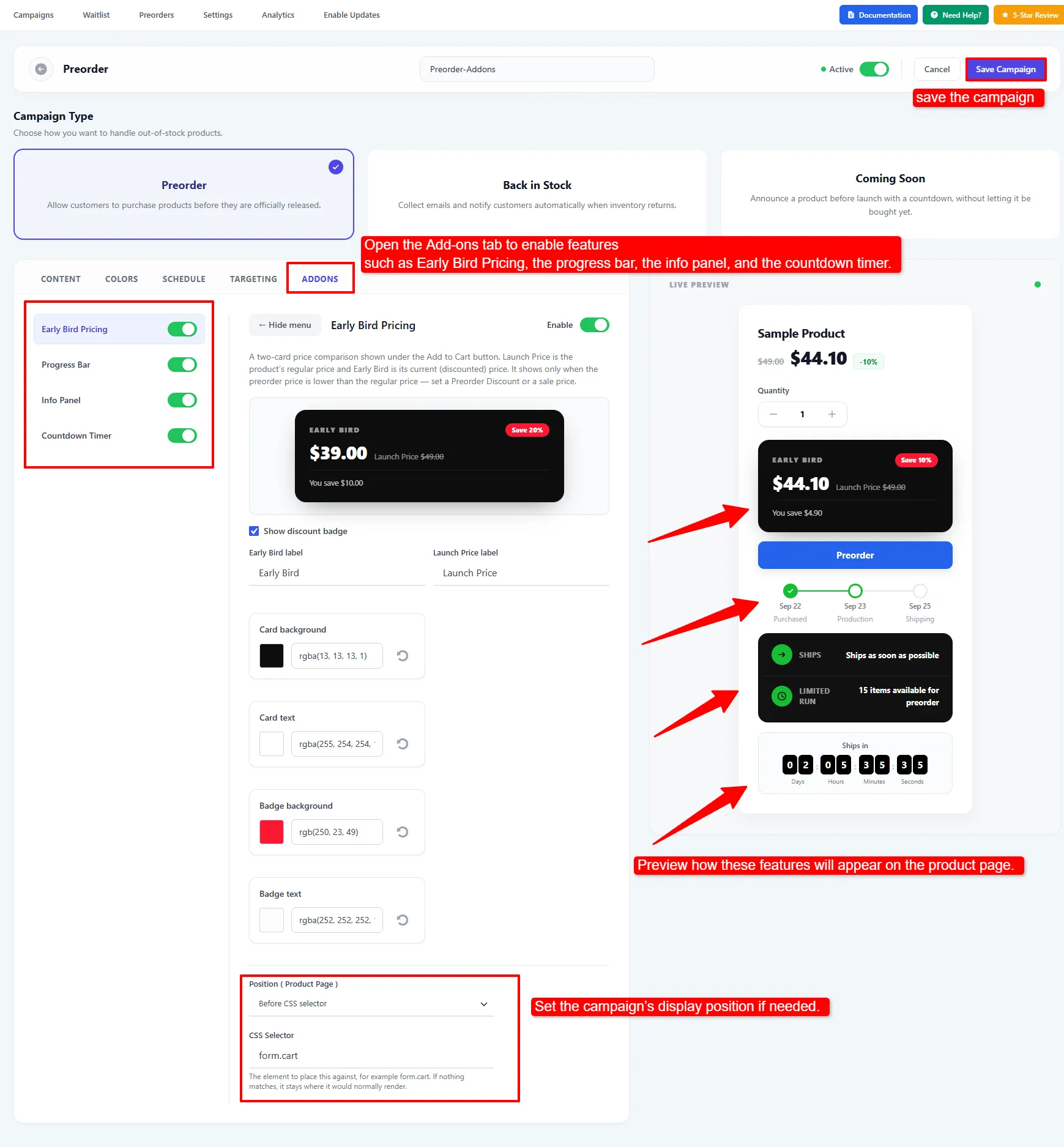
Enable each add-on in the left menu, adjust its settings and position, preview the result, then save the campaign.
The live preview shows how enabled widgets fit together. Check a targeted product on the storefront after saving, especially if you changed a widget's position or used a CSS selector to place it near your theme's Add to Cart form.
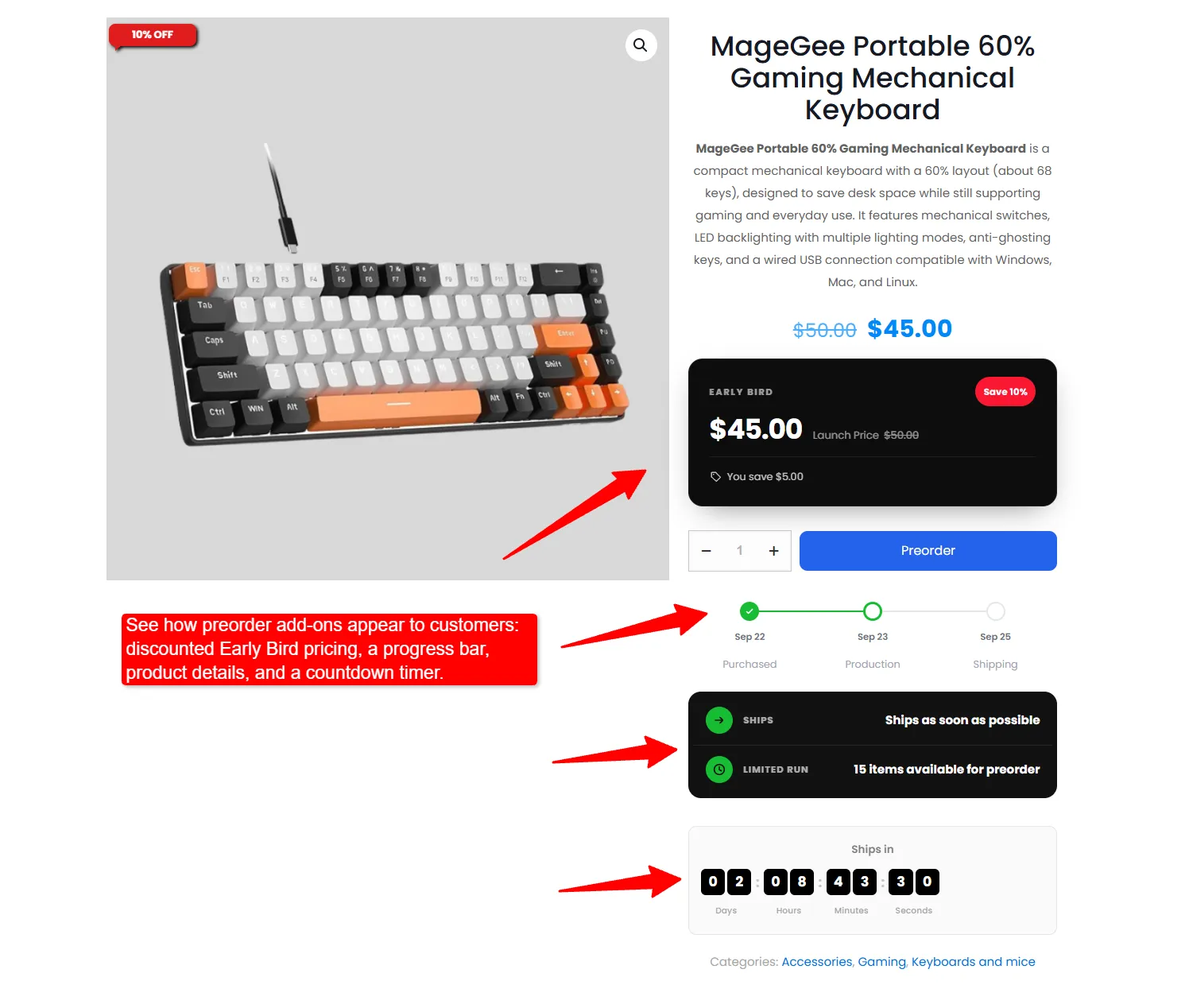
The product page shows the discounted price and all four enabled preorder widgets.
Coming Soon Campaigns
A third campaign type that announces a product before you can sell it: Add to Cart is replaced with an inert label, the product is made non-purchasable, and an optional countdown shows when it arrives. The inverse of a Preorder — attention instead of revenue.
See Coming Soon for the full setup.
Extra Back in Stock Email Layouts
Pro adds three more branded email layouts alongside the free Centered layout — Hero, Split and Minimal. See Emails for the full designer.
Analytics
The Pro-only Analytics tab brings preorder units, fulfilment progress, revenue, waitlist signups, notification activity, and product rankings together. See Analytics for the dashboard and how to read each section.
Waitlist CSV Export
Download the filtered waitlist from the Waitlist screen. See Waitlist.
Advanced Targeting & Rules
| Feature | What it does |
|---|---|
| Category & tag targeting | Target campaigns by product category or tag, with the same Include/Exclude rules. |
| Mixed-cart prevention | Stop preorder and in-stock items being bought in the same cart, so preorders can ship separately. |
| Order limits | Cap the total quantity available for preorder, set on the product's Inventory tab. |
| B2B / user-role rules | Show preorder behaviour only to selected user roles, e.g. wholesale. |
| Region / country targeting | Allow preorders only for selected billing/shipping countries. |
| Automatic product tagging | Auto-assign a wepo_status term (preorder / backorder / back-in-stock) for filtering and reporting. |
Global toggles for several of these live under Preorders → Settings → Pro Features. See Advanced Rules for setup steps, order-limit behaviour, and how role and country restrictions are evaluated.
🧪 Example configuration
A crowdfunded product launch:
| Setting | Value |
|---|---|
| Campaign type | Preorder |
| Deposit | Partial payment, 25% |
| Display mode | Offer full or partial choice |
| Preorder discount | 10% off |
| Stop taking preorders after | 500 preorders |
| Addons | Early Bird Pricing + Countdown to ship date |
Licence & updates
Enter your licence key under Preorders → Enable Updates. The key is sent with each update check so the update server can serve updates to licensed sites.
The licence enables automatic updates. Pro features work whenever the add-on is active; without a key you simply will not receive update notifications.
Next Steps
- Preorder — the free preorder features these build on.
- Partial Payments — configure deposits and track the remaining balance.
- Coming Soon — announce a product before it can be purchased.
- Analytics — review preorder and waitlist activity.
- Advanced Rules — set order limits, mixed-cart prevention, roles, regions and status tags.
- Emails — the email designer and the extra layouts.
- Waitlist — analytics and CSV export in context.
Frequently asked questions
How do I take a deposit on a WooCommerce preorder?
Enable partial payment on the preorder campaign, set a percentage or fixed deposit, and choose whether customers may pick full payment instead. The balance is recorded on the order; after collecting it, use the Mark preorder balance as paid action. See Partial Payments for the full walkthrough.
Is the remaining balance charged automatically?
No. In this release the balance is recorded on the order and collected manually. Automatic off-session charging is not included.
What happens to my data if I deactivate Pro?
Nothing is lost. Pro is a pure add-on — campaigns, waitlist rows and settings belong to the Free plugin. Deactivating Pro simply stops the premium behaviour.
Do Pro features stop working if my licence expires?
The features keep working; you stop receiving automatic updates. The licence gates updates, not functionality.
Can I use deposits and preorder discounts together?
Yes. The discount sets the product price, and the deposit is calculated from the discounted total.