Installation
Follow this guide to install the Discount Rules and Dynamic Pricing for WooCommerce (formerly Easy WooCommerce Discounts) plugin to your WordPress site.
📋 Table of Contents
Free Version: Install and Activate the Plugin
- First ensure that you have installed & activated WooCommerce plugin on your website.
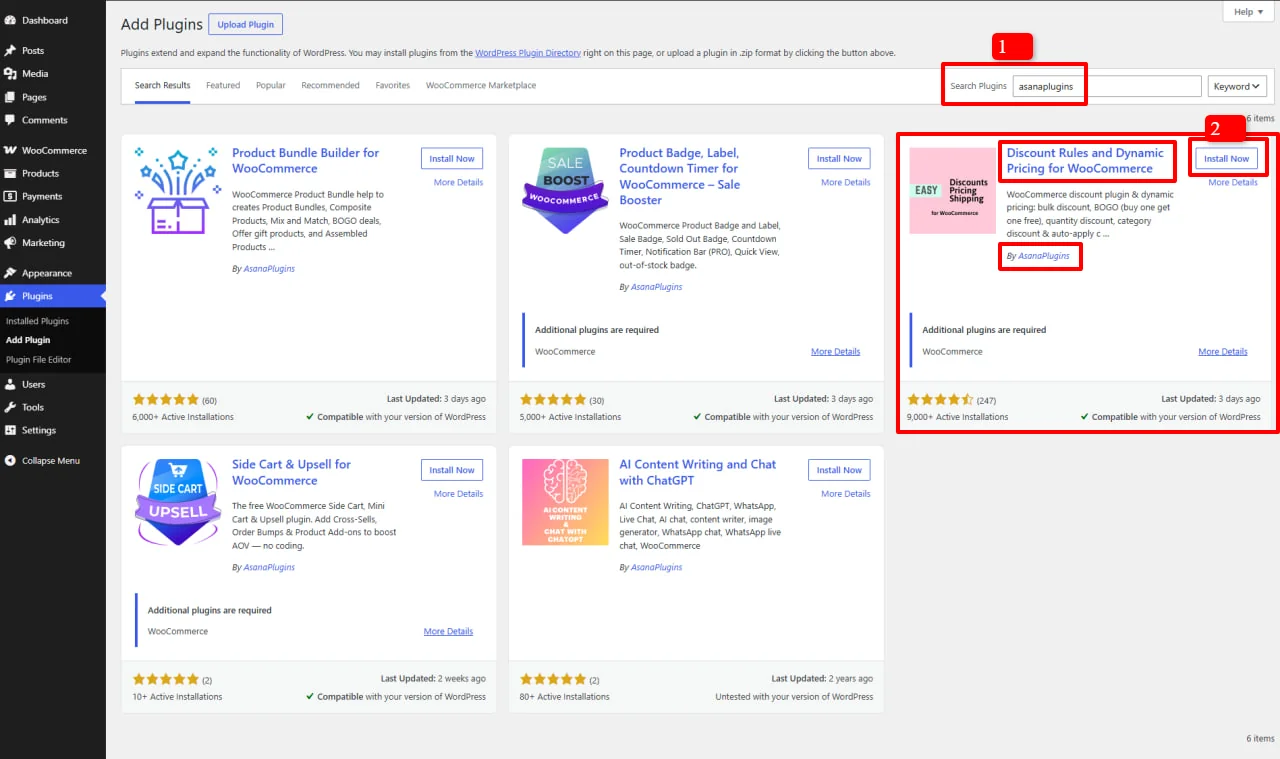
- Go to Plugins > Add New in your WordPress admin
- Search for "asanaplugins" or Discount Rules and Dynamic Pricing for WooCommerce
- Find the Discount Rules and Dynamic Pricing for WooCommerce plugin by asanaplugins in the search results
- Click Install Now button to install it
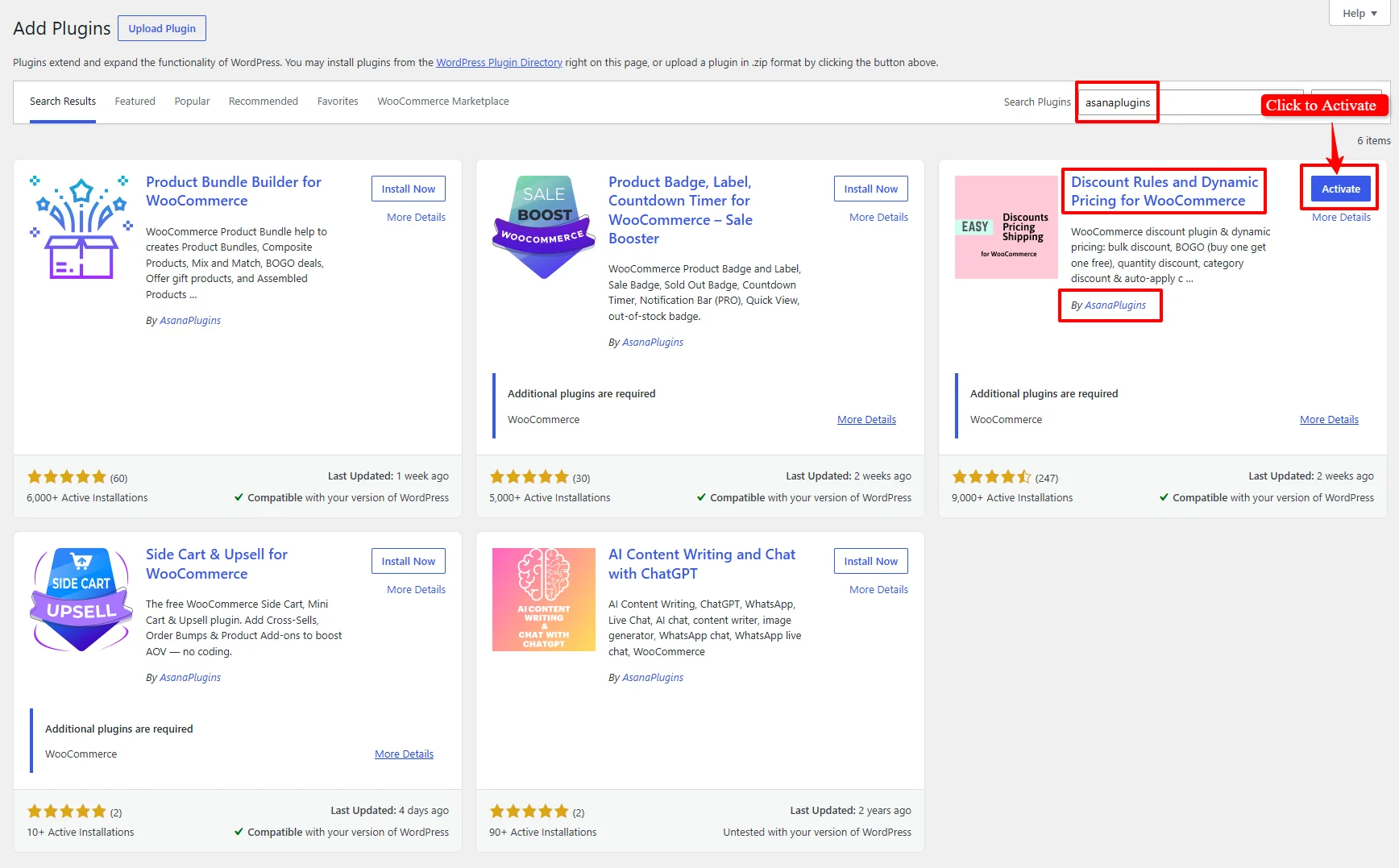
- Click Activate button to activate the plugin
Pro Version: Install and Activate the Plugin
Step 1: Ensure WooCommerce is Installed
First ensure that you have installed & activated WooCommerce plugin on your website.
Step 2: Deactivate the Free Version (Current Version Requirement)
⚠️ Important: For the current Pro version, the free version must be deactivated on your website. You cannot have both the free and Pro versions active simultaneously.
- Go to Plugins > Installed Plugins in your WordPress admin
- Locate "Discount Rules and Dynamic Pricing for WooCommerce" (the free version)
- Click Deactivate to deactivate it

📌 Note for Future Versions (v10 and above): Starting from version 10, the free version will become a core dependency for the Pro version. This means the free version will be required to be active for the Pro version to work. We will update this guide when that change takes effect.
Step 3: Purchase and Download the Pro Plugin
- Visit www.asanaplugins.com to purchase the Discount Rules and Dynamic Pricing for WooCommerce PRO plugin
- Download the plugin .zip file from your account on asanaplugins.com
Step 4: Upload and Install the Pro Plugin
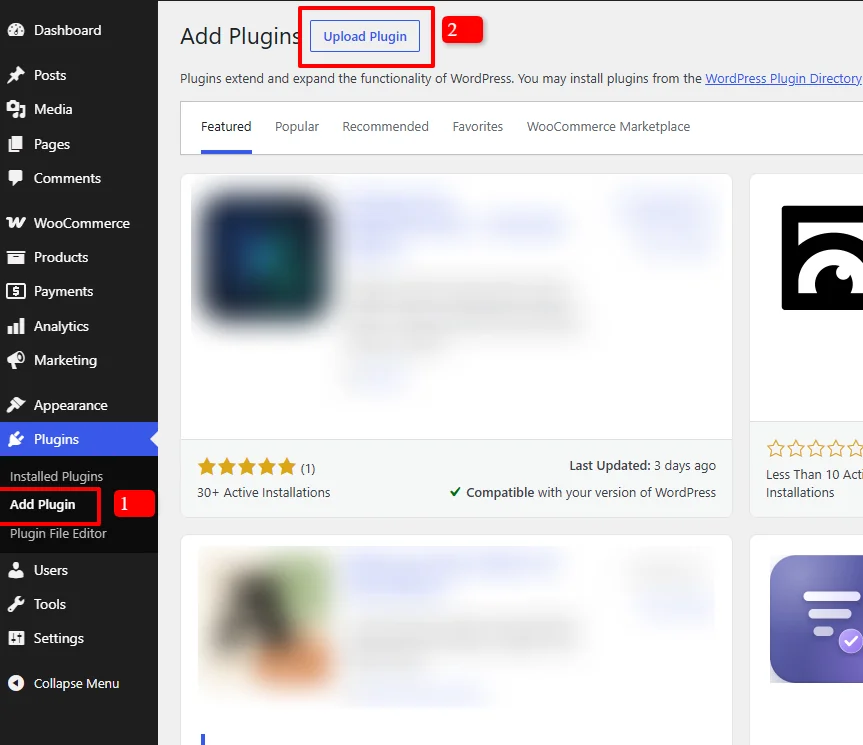
- In your WordPress dashboard, go to Plugins > Add New > Upload Plugin
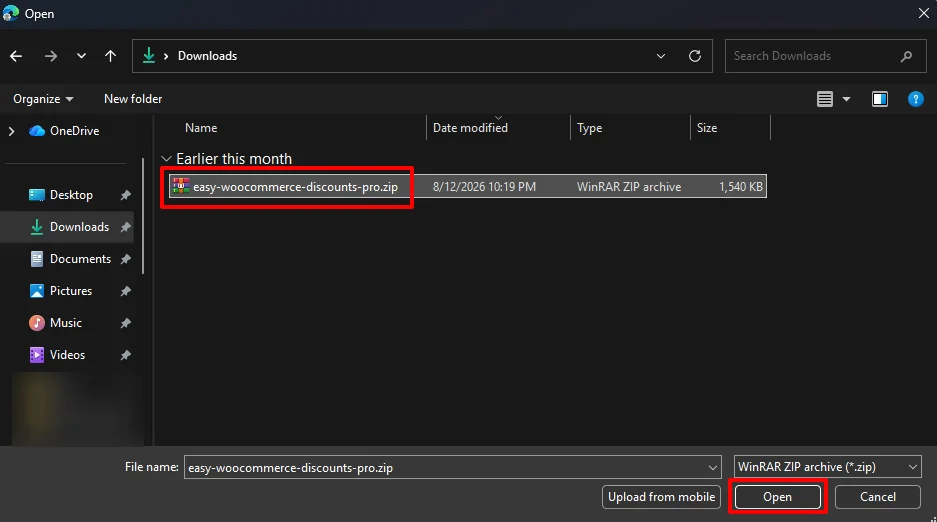
- Click the Choose File button
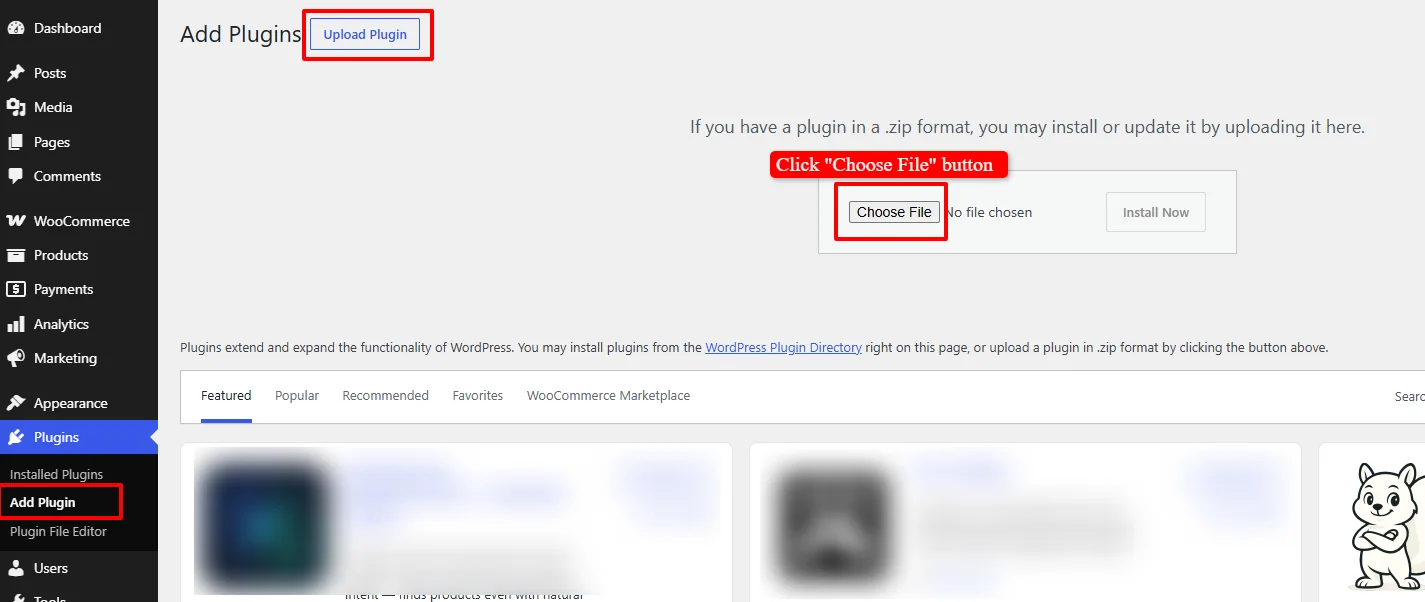
- Select the easy-woocommerce-discounts-pro.zip file from your computer
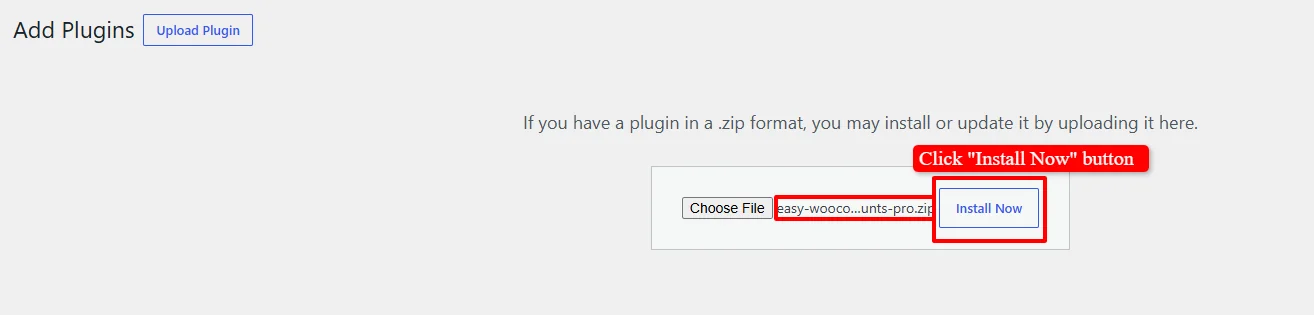
- Click Install Now to upload and install the plugin
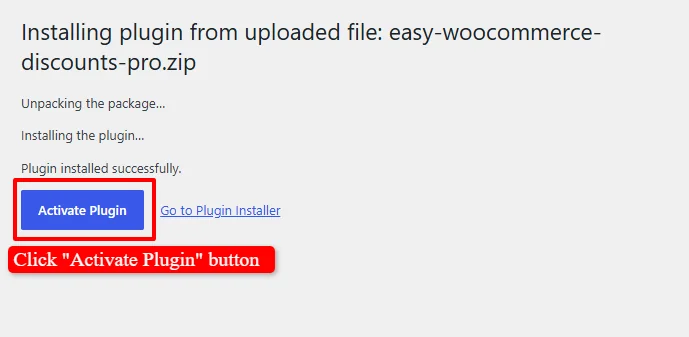
- Once the installation is complete, click the Activate Plugin button to activate it
Step 5: Verify Installation
After activation, a new Woo Pricing & Discounts menu should appear in your WordPress admin dashboard. This confirms that the plugin has been successfully installed and activated.
🎉 Success!
You've successfully installed the Discount Rules and Dynamic Pricing for WooCommerce plugin. You're now ready to start creating discount rules, dynamic pricing, and promotional campaigns for your WooCommerce store.
Experience all discount rules and pricing strategies in action on our Live Demo Website.
Upgrade to Discount Rules and Dynamic Pricing for WooCommerce PRO to unlock advanced conditions, user role pricing, recurring schedules, tiered variations, and priority support.
📚 Next Steps
Now that you have installed the plugin, explore these essential guides to start boosting sales and configuring dynamic pricing campaigns:
🏷️ Pricing & Simple Discounts
- Create Storewide Sale Prices — Set up percentage or fixed amount discounts across your entire store catalog.
- Create Targeted Sale Prices for Products, Variations & Categories — Apply custom sale prices to specific products, variable items, or entire categories.
- Create Role-Based Pricing — Offer exclusive pricing tiers for VIP members, wholesale clients, or specific user roles.
📦 Volume, Bulk & Tiered Pricing
- Create Bulk Quantity Discounts — Reward higher purchase volumes by discounting all units once a quantity threshold is met.
- Create Tiered Quantity Discounts — Set progressive bracket pricing where each quantity range has its own discounted rate.
- Display Quantity Table on Product Pages — Show a clear, transparent bulk pricing breakdown directly on product pages.
🎁 BOGO (Buy One Get One) & Bundle Deals
- Create Buy 1 Get 1 Free (BOGO) Deals — Launch classic Buy 1 Get 1 Free offers to clear inventory and attract shoppers.
- Create Buy 1 Get 1 Half Price (50% Off) — Double your sales volume while maintaining healthier profit margins than free giveaways.
- Create Buy 2 Get 1 Free Deals — Encourage customers to buy larger quantities with 3-for-2 promotional offers.
- Create Buy X Get Y Free Deals — Offer a free gift or complementary product when purchasing a specific main item.
- Create Buy 3, Cheapest Item Free Deals — Automatically discount the lowest-priced item in the cart when 3 eligible items are purchased.
- Create Product Bundle Discounts — Group related products together and sell them at a special package price.
- Create Mix & Match Product Discounts — Allow customers to select any combination of products (e.g., "Buy Any 4 for $50").
🛒 Cart Discounts & Automatic Coupons
- Automatic Coupons & Cart Discounts — Automatically apply discounts at checkout based on cart subtotal, user role, or payment method.
- Minimum Spend / Cart Total Discounts — Reward shoppers who reach a minimum spend threshold (e.g., $10 off orders over $100).
⚡ Visual Promotions & Urgency
- Display Promotional Badges & Sale Labels — Draw attention to discounted items with custom sale badges on catalog and product pages.
- Add a Countdown Timer — Drive urgency and boost flash sale conversions with a live countdown timer.
🔍 SEO Keywords
Primary Keywords: install WooCommerce discount plugin, Discount Rules and Dynamic Pricing installation, Easy WooCommerce Discounts install, WooCommerce discount plugin installation
Secondary Keywords: install WooCommerce discount plugin, activate discount plugin, WooCommerce discount rules, dynamic pricing WooCommerce, WooCommerce discount plugin, asanaplugins install