Create Buy X Get Y Free Deals in WooCommerce (Pricing Rules)
Learn how to create powerful Buy X Get Y free deals in WooCommerce using the Discount Rules and Dynamic Pricing for WooCommerce plugin. This complete guide covers cross-product promotions where buying one product gives customers a different product for free. Perfect for introducing new products, clearing inventory, and rewarding high-value purchases.
📋 Table of Contents
- Understanding Buy X Get Y Free Deals
- Step-by-Step: Create a Buy X Get Y Free Deal
- Quick Reference Table
- Next Steps
🚀 Understanding Buy X Get Y Free Deals
Buy X Get Y Free (BXGY) deals allow you to promote a specific product (Y) by giving it away for free when a customer buys a different product (X). This is a powerful cross-selling strategy that helps introduce new products, move slow-moving inventory, or reward high-value purchases.
Why Use Buy X Get Y Free?
| Strategy | Best For | Example |
|---|---|---|
| Introducing new products | Get customers to try new items | Buy a Jacket, get a new Shirt for free |
| Clearing inventory | Move slow-selling products | Buy a Hoodie, get a Cap for free |
| Rewarding high-value purchases | Encourage larger orders | Buy a Premium Bag, get a Wallet for free |
| Cross-selling | Increase average order value | Buy a Camera, get a Tripod for free |
How Buy X Get Y Works
When you create a BXGY rule, the plugin automatically:
- Identifies when a customer adds the "Buy" product to their cart
- Adds the "Get" product to the cart as a free gift
- Applies 100% discount to the "Get" product
- Recalculates the total when quantities change
Key Feature: The plugin automatically adds the free product to the cart without requiring the customer to manually select it. This creates a frictionless shopping experience that encourages customers to complete their purchase.
Important Note on Auto-Add Behavior: The automatic addition of free products to the cart works only when you add a single product under the Discounted products section. If you add multiple products as discounted items (e.g., Shirt and Cap as "Get" products), the plugin will not automatically add them. Instead, the customer will need to manually add the free products to their cart. To enable automatic addition, ensure only one product is selected in the Discounted products section.
Now you're ready to create Buy X Get Y free rules under the Woo Pricing & Discounts > Pricing tab.
Step-by-Step: Create a Buy X Get Y Free Deal
Best for: Promoting specific products by giving them away for free when customers buy a different product. Perfect for introducing new products, clearing inventory, and rewarding high-value purchases.
Scenario: Create a "Buy X Get Y Free" deal where:
- Buy: A Jacket ($25.00)
- Get: A Shirt ($20.00) for free
When a customer buys one Jacket, the plugin automatically adds one Shirt to the cart for free.
Step 1: Access Pricing and Choose a Template
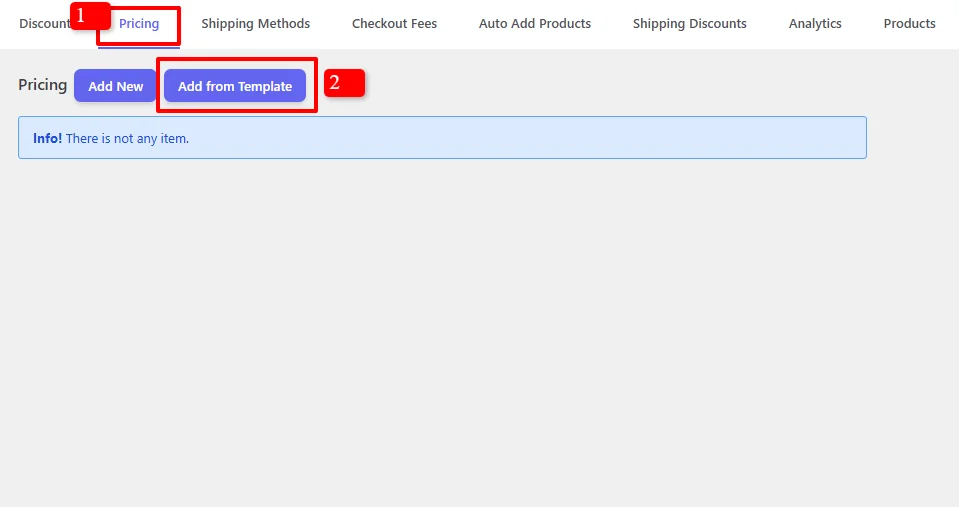
- In your WordPress admin, go to the Woo Pricing & Discounts menu
- Open the Pricing tab
- Click on the Add from Template button to quickly start a new rule
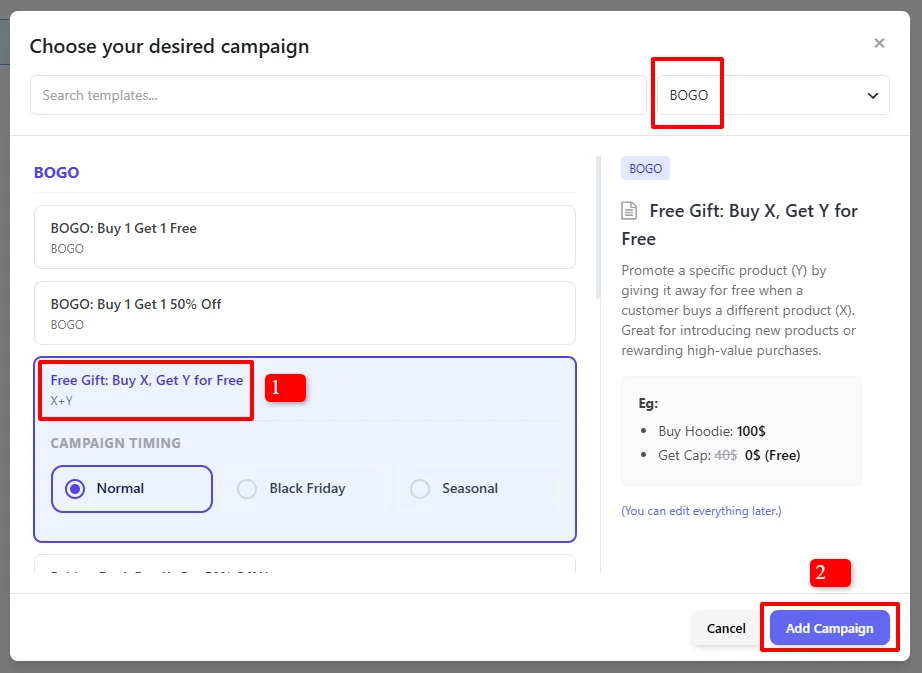
- In the "Choose your desired campaign" modal, search for templates
- Under BOGO, find and select "Free Gift: Buy X, Get Y for Free"
- Click "Add Campaign"
Step 2: Configure the Discount Rule
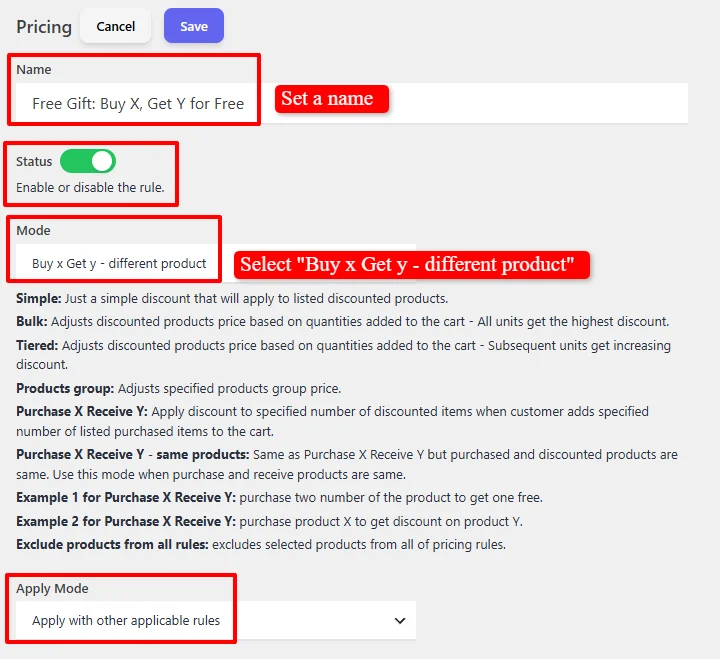
- Name: "Free Gift: Buy X, Get Y for Free" (customizable)
- Status: Ensure Enable is checked
- Mode: Select "Buy x Get y - different product" for cross-product BOGO offers
- Apply Mode: Choose how this rule interacts with other pricing rules
- Apply with other applicable rules (Non-Exclusive): Works alongside other discounts
- Apply this rule and disregard other rules - Exclusive: Disregards all other applicable rules
- Apply if other rules are not applicable: Acts as a fallback
Step 3: Configure Display Options
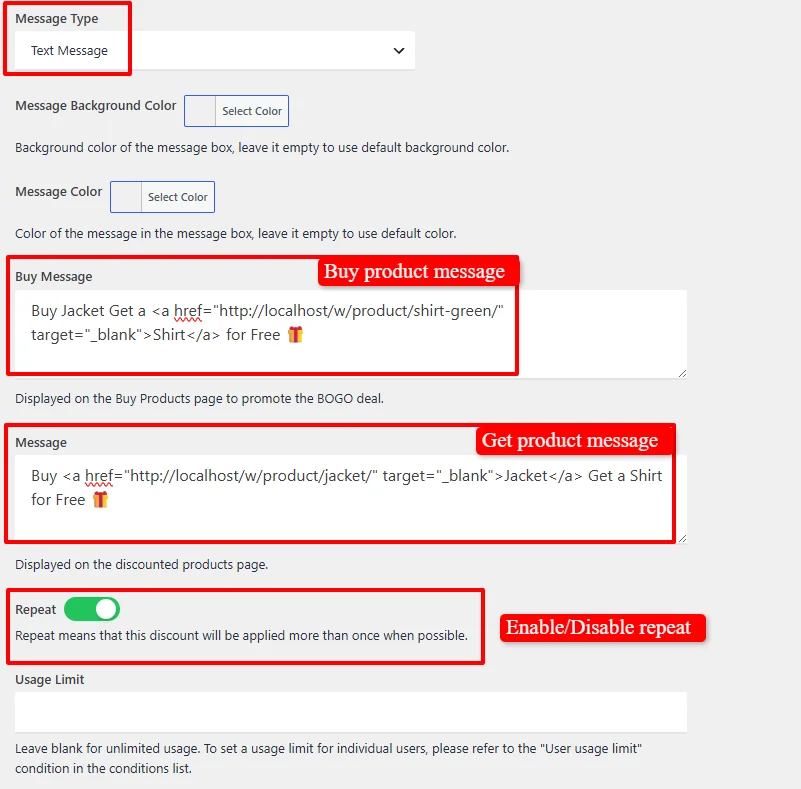
- Message Type: Select "Text Message"
- Message Background Color: (Optional) Customize the message box background color
- Message Color: (Optional) Customize the message text color
- Buy Message: Set a message displayed on the "Buy" product page, e.g.,
Buy Jacket Get a Shirt for Free - Message: Set a message displayed on the "Get" product page, e.g.,
Buy a Jacket Get a Shirt for Free - Repeat: Enable this option to apply the discount repeatedly when possible
- Repeat means that this discount will be applied more than once when possible
- For example, if a customer buys 2 Jackets with Repeat enabled, they get 2 Shirts for free
- With Repeat disabled, they would only get 1 free Shirt regardless of quantity
- Usage Limit: Leave blank for unlimited uses
Step 4: Set the Purchase Rule
Under the Purchase Rule section, you define the BXGY logic:

- Purchase: Set the quantity the customer must buy (e.g.,
1) - Receive: Set the quantity the customer receives for free (e.g.,
1) - Discount Type: Choose the type of discount:
- Percentage discount - For free items, set to
100(100% off) - Price discount - For fixed dollar discounts
- Fixed price - For setting a specific price for received items
- Percentage discount - For free items, set to
- Discount: Set the discount value (e.g.,
100for 100% off)
Example: For "Buy Jacket, Get Shirt Free":
- Purchase:
1 - Receive:
1 - Discount Type:
Percentage discount - Discount:
100
Note: When you set the discount to 100%, the plugin automatically adds the free product to the cart provided only one product is selected in the Discounted products section. The customer doesn't need to select anything—the free item appears automatically at checkout.
Step 5: Select Purchased Items (Buy Products)
Under the Purchased Items section, you define which products trigger the free gift:
- Add a "Products in list" condition
- Search for and select the "Buy" products
- You can add multiple products into the search field
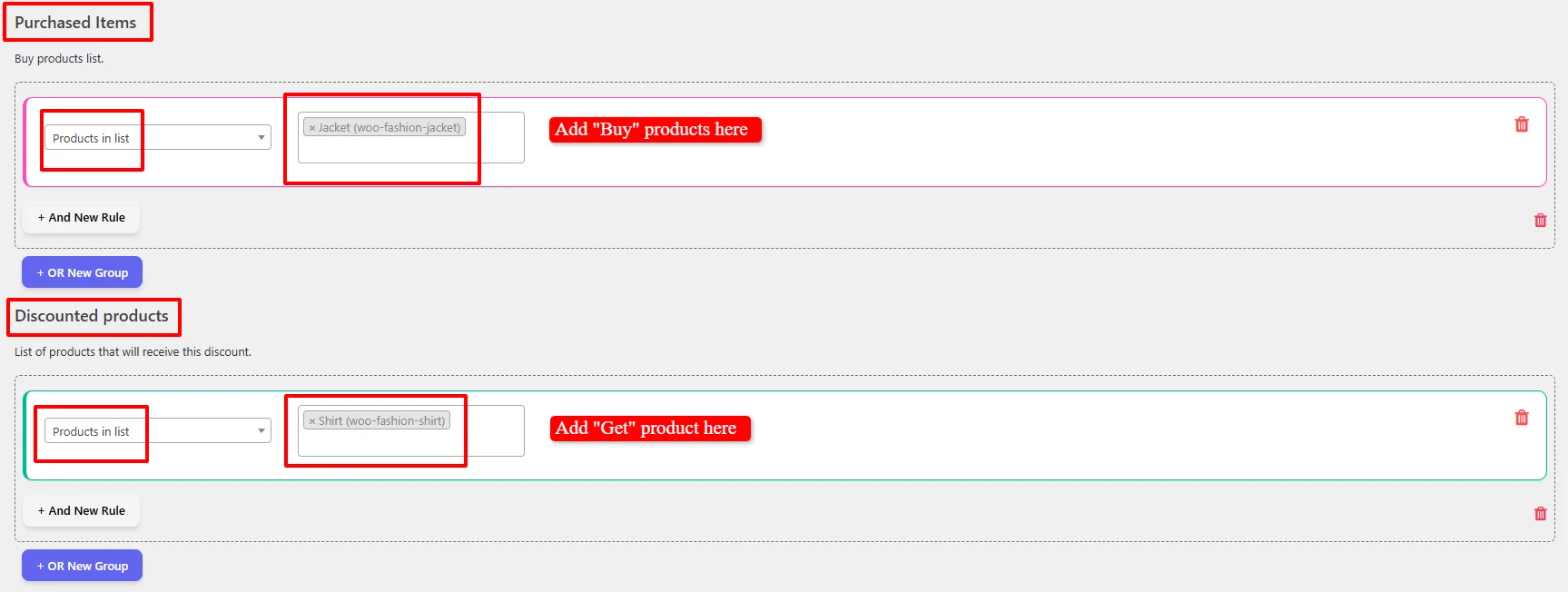
Example: In our tutorial, we'll select Jacket (woo-fashion-jacket) as the "Buy" product.
Step 6: Select Discounted Products (Get Products)
Under the Discounted products section, you define which products are given away for free:
- Add a "Products in list" condition
- Search for and select the "Get" products
- You can add multiple products into the search field
Example: In our tutorial, we'll select Shirt (woo-fashion-shirt) as the "Get" product.
⚠️ Important: Auto-add of free products only works when you select a single product in the Discounted products section. If you need to offer a choice of multiple free products (e.g., "Buy a Jacket and get either a Shirt OR a Cap for free"), customers must manually add their preferred free product to the cart. The discount will still apply correctly, but the product won't be auto-added.
For detailed information on filtering products by categories, variations, attributes, stock status, or dynamic segments, check out our Product Selection Guide.
Step 7: Exclude Products (Optional)
The Excluded Products section allows you to exclude specific products from the BXGY deal:
- Under the Excluded Products section, add a "Products in list" condition
- Search for and select the products you want to exclude from the deal
- Add multiple excluded products to the search field
Step 8: Schedule the Deal (Optional)
By default, the campaign is unscheduled and runs immediately:

For scheduled promotions, under the "Date Time" section to configure:
- Date Range - Run a promotion over a period
- Date Time Range - Precise start and end date/time for flash sales
- Specific Date - Single date activation
- Days - Recurring weekly promotions
- Time - Daily time ranges

Use "+ And New Rule" to combine conditions or "+ OR New Group" for alternative schedules.
For a deep dive into timezone setup, recurring schedules, and multi-tier scheduling logic, read our comprehensive Scheduling & Date-Time Guide.
Step 9: Save and Test
Click Save and test by adding the "Buy" product to the cart.
Result Example
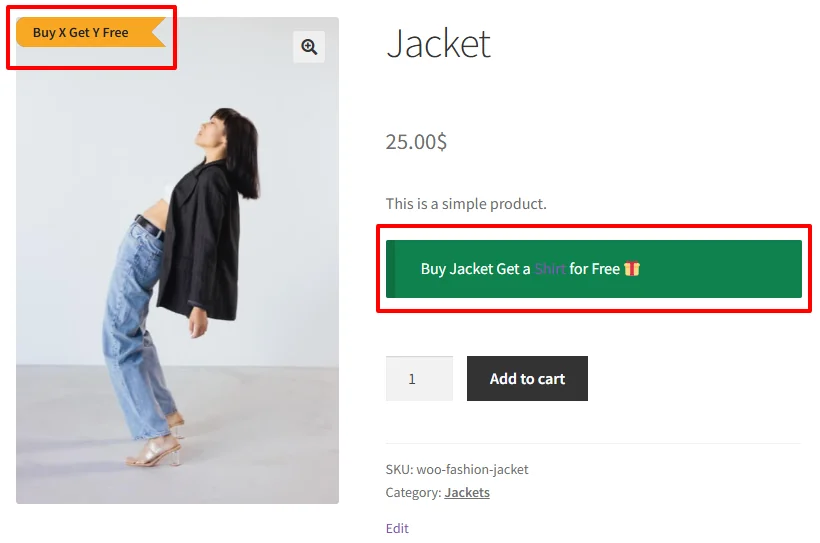
Product Page - "Buy" Product (Jacket)
The "Buy" product page displays:
- Original price: $25.00
- "Buy Jacket Get a Shirt for Free" message
- Promotional badge indicating the free gift
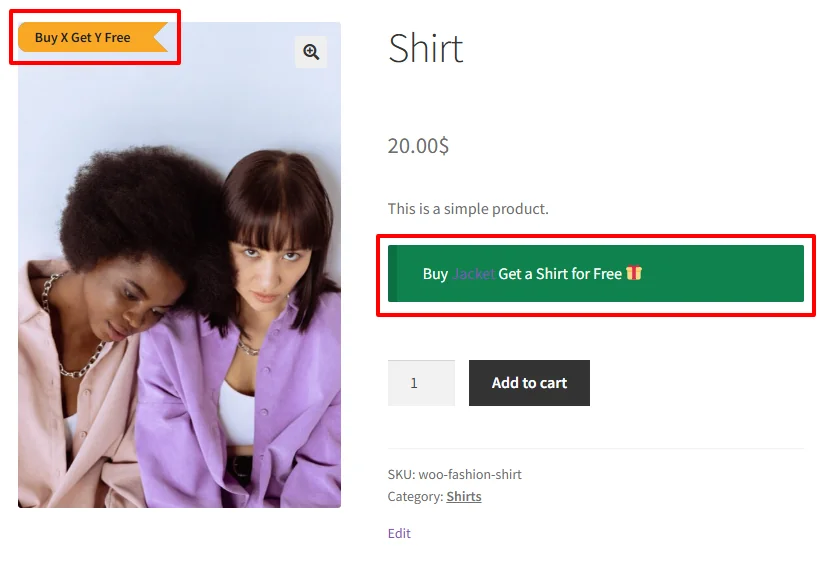
Product Page - "Get" Product (Shirt)
The "Get" product page displays:
- "Buy Jacket Get a Shirt for Free" message
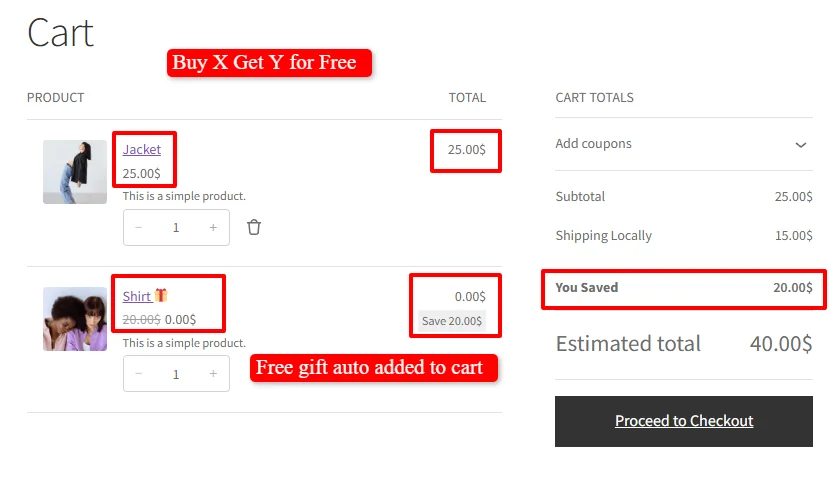
Cart Example - Buy 1 Jacket, Get 1 Shirt Free
Cart when customer buys 1 Jacket:
- Jacket: $25.00 (purchased item)
- Shirt: $20.00 → $0.00 (free gift - automatically added!)
Subtotal: $25.00 (Original: $45.00) You Saved: $20.00
Cart Example - Buy 2 Jackets with Repeat Enabled
Cart with 2 Jackets (Repeat enabled):
- Jacket 1: $25.00 (purchased)
- Jacket 2: $25.00 (purchased)
- Shirt 1: $20.00 → $0.00 (free!)
- Shirt 2: $20.00 → $0.00 (free!)
Subtotal: $50.00 (Original: $90.00) You Saved: $40.00
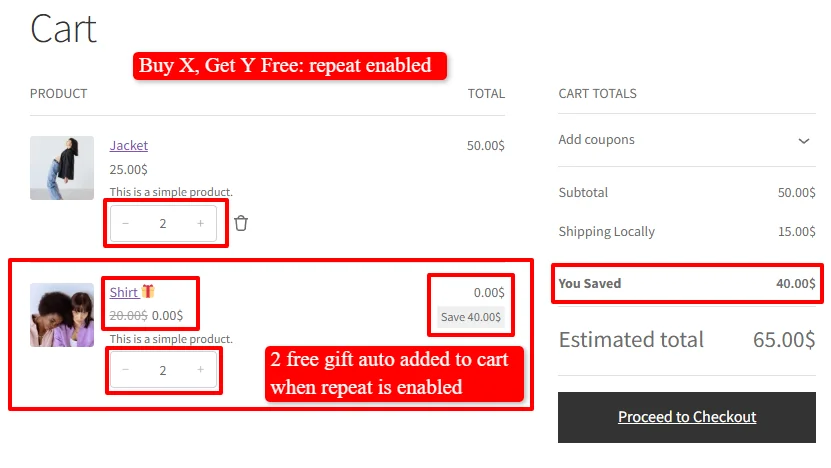
Note: With Repeat enabled, the plugin automatically creates a pattern of "Buy 1 Jacket, Get 1 Shirt Free" repeatedly. The free Shirts are automatically added to the cart.
Quick Reference Table
| BXGY Scenario | Buy (X) | Get (Y) | Discount Type | Discount | Example |
|---|---|---|---|---|---|
| Buy Jacket Get Shirt Free | Jacket | Shirt | Percentage | 100 | Jacket $25 + Shirt Free |
| Buy Hoodie Get Cap 50% Off | Hoodie | Cap | Percentage | 50 | Hoodie $50 + Cap $15 |
| Buy 2 Shirts Get 1 Free | 2 Shirts | 1 Shirt | Percentage | 100 | 3 Shirts for price of 2 |
| Buy 3 Get 1 Free | 3 Items | 1 Item | Percentage | 100 | 4 Items for price of 3 |
🎉 Success!
You've learned how to create Buy X Get Y free deals using the Discount Rules and Dynamic Pricing plugin for WooCommerce. This powerful feature allows you to:
- Create cross-product promotions that drive sales of specific items
- Introduce new products by giving them away as free gifts
- Clear slow-moving inventory by bundling with popular products
- Automatically add free products to the cart when only one product is selected
For 100% discount BXGY deals, the plugin automatically adds the free product to the cart when only one product is selected in the Discounted products section, creating a frictionless shopping experience that encourages customers to complete their purchase. When multiple products are offered as free gifts, customers can manually select their preferred free product.
Experience all discount rules and pricing strategies in action on our Live Demo Website.
Upgrade to Discount Rules and Dynamic Pricing for WooCommerce PRO to unlock advanced conditions, user role pricing, recurring schedules, tiered variations, and priority support.
📚 Next Steps
Now that you've mastered Buy X Get Y Free promotions, explore other gift and combo rules:
- Buy 2X Get 1Y Free — Require buying two main products before granting the free gift item.
- Buy 1 Get 1 Free (Same Product) — Offer free duplicates of the same purchased item.
- Product Bundle Discounts — Package item X and item Y together as an attractive product bundle.
- Buy 3, Cheapest Item Free — Allow customers to pick 3 items and get the cheapest one free.
- Add Countdown Timer — Add limited-time urgency for gift-with-purchase campaigns.
🔍 SEO Keywords
Primary Keywords: buy x get y free WooCommerce, free gift WooCommerce, WooCommerce discount rules, dynamic pricing WooCommerce, WooCommerce pricing rules, cross-product promotions WooCommerce
Secondary Keywords: buy x get y, free gift with purchase, product bundling WooCommerce, free product auto-add, percentage discount BXGY, WooCommerce BOGO, cross-selling WooCommerce, introduce new products, clear inventory, reward high-value purchases, WooCommerce free gift plugin, Discount Rules and Dynamic Pricing plugin