Create Free Shipping for Specific User Roles in WooCommerce (Wholesale Shipping)
Learn how to create free shipping for specific user roles in WooCommerce using the Discount Rules and Dynamic Pricing plugin. This complete guide covers offering free shipping exclusively to wholesale customers, VIP members, or any user role, encouraging loyalty and boosting wholesale orders.
📋 Table of Contents
- Why Offer Free Shipping for Specific User Roles?
- Step-by-Step: Create a Free Shipping Rule for User Roles
- Result Example
- Troubleshooting: Free Shipping Not Showing?
- Next Steps
🚀 Why Offer Free Shipping for Specific User Roles?
Offering free shipping for specific user roles is a powerful strategy to reward your best customers—such as wholesale buyers, VIP members, or partners—and encourage repeat business. By providing exclusive shipping benefits, you enhance customer satisfaction and build loyalty.
Key Benefits
- Reward loyal customers — Free shipping is a highly valued perk that incentivizes repeat purchases
- Encourage wholesale orders — Wholesale buyers appreciate free shipping, especially on large-volume orders
- Competitive advantage — Differentiate your store from competitors who don't offer role-based incentives
- Increase average order value — Wholesale customers are more likely to order more when shipping costs are removed
Key Statistic: 78% of shoppers are willing to spend more to qualify for a free shipping offer .
Step-by-Step: Create a Free Shipping Rule for User Roles
Best for: Rewarding specific customer groups (wholesale, VIP, partners) with free shipping. Perfect for B2B stores and membership programs.
Scenario: Offer free shipping automatically to users with the Wholesale user role.
Step 1: Access Shipping Methods and Choose a Template
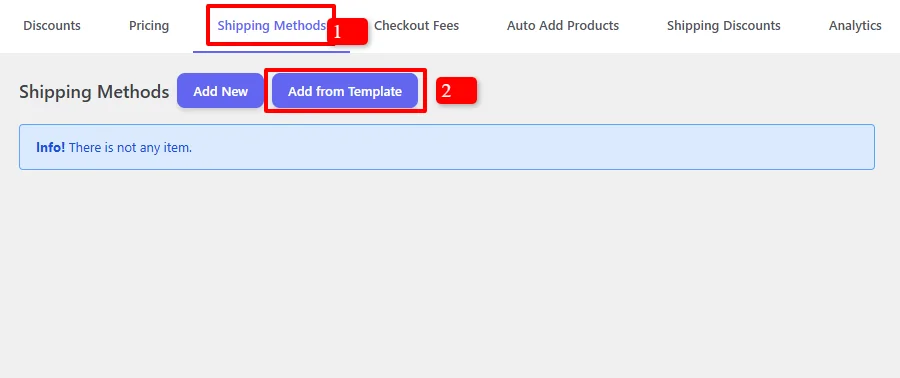
- In your WordPress admin, go to the Woo Pricing & Discounts menu
- Open the Shipping Methods tab
- Click on the Add from Template button to quickly start a new rule
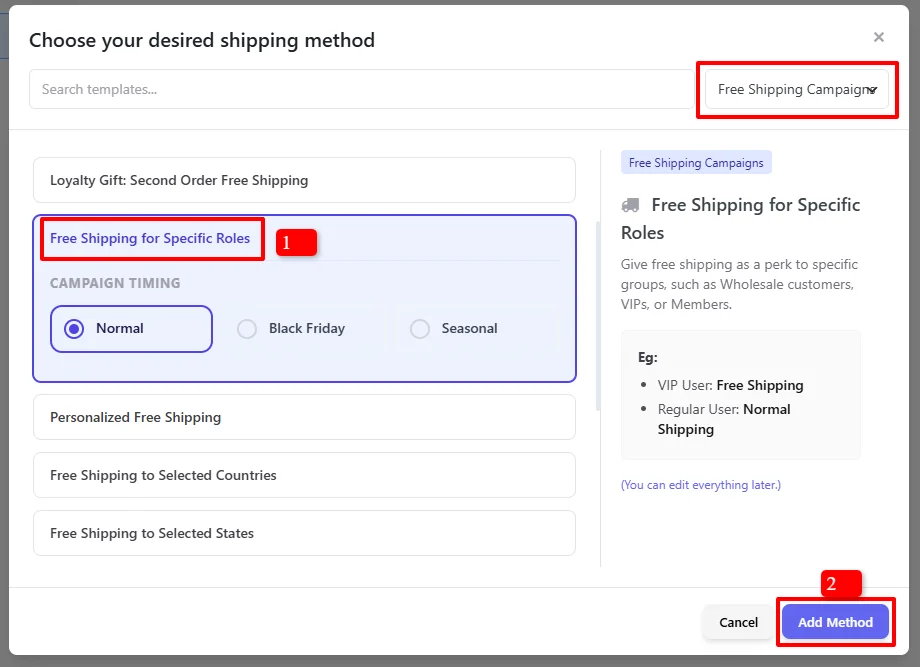
- In the "Choose your desired shipping method" modal, search for templates
- Under Free Shipping Campaigns, find and select "Free Shipping for Specific Roles"
- Click "Add Method"
Step 2: Configure the Shipping Method
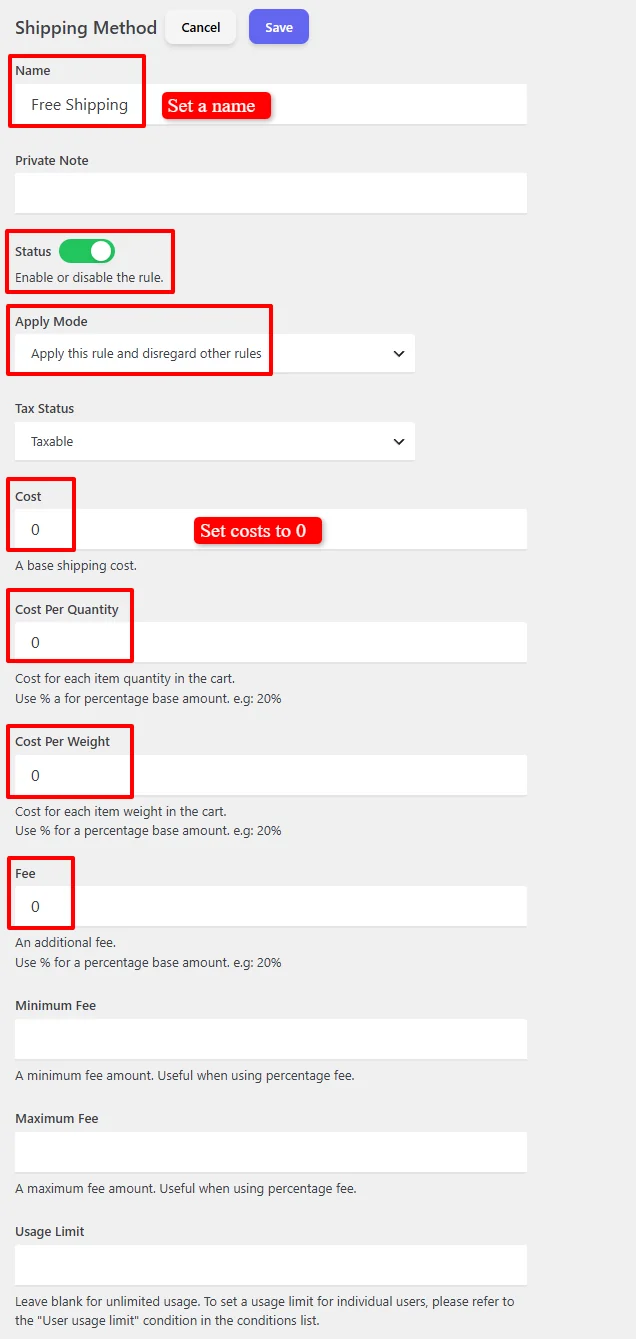
- Name: "Free Shipping" (customizable)
- Status: Ensure Enable is checked
- Apply Mode: Choose how this rule interacts with other shipping methods
- Apply this rule and disregard other rules — Only free shipping will be shown for the selected roles
- Apply with other applicable rules — Free shipping will appear alongside other options
- Tax Status: Choose Taxable or None
- Cost: Set to
0for free shipping - Cost Per Quantity: Leave as
0 - Cost Per Weight: Leave as
0 - Fee: Leave as
0 - Usage Limit: Leave blank for unlimited uses
Step 3: Schedule the Shipping Rule (Optional)
By default, the campaign is unscheduled and runs immediately:

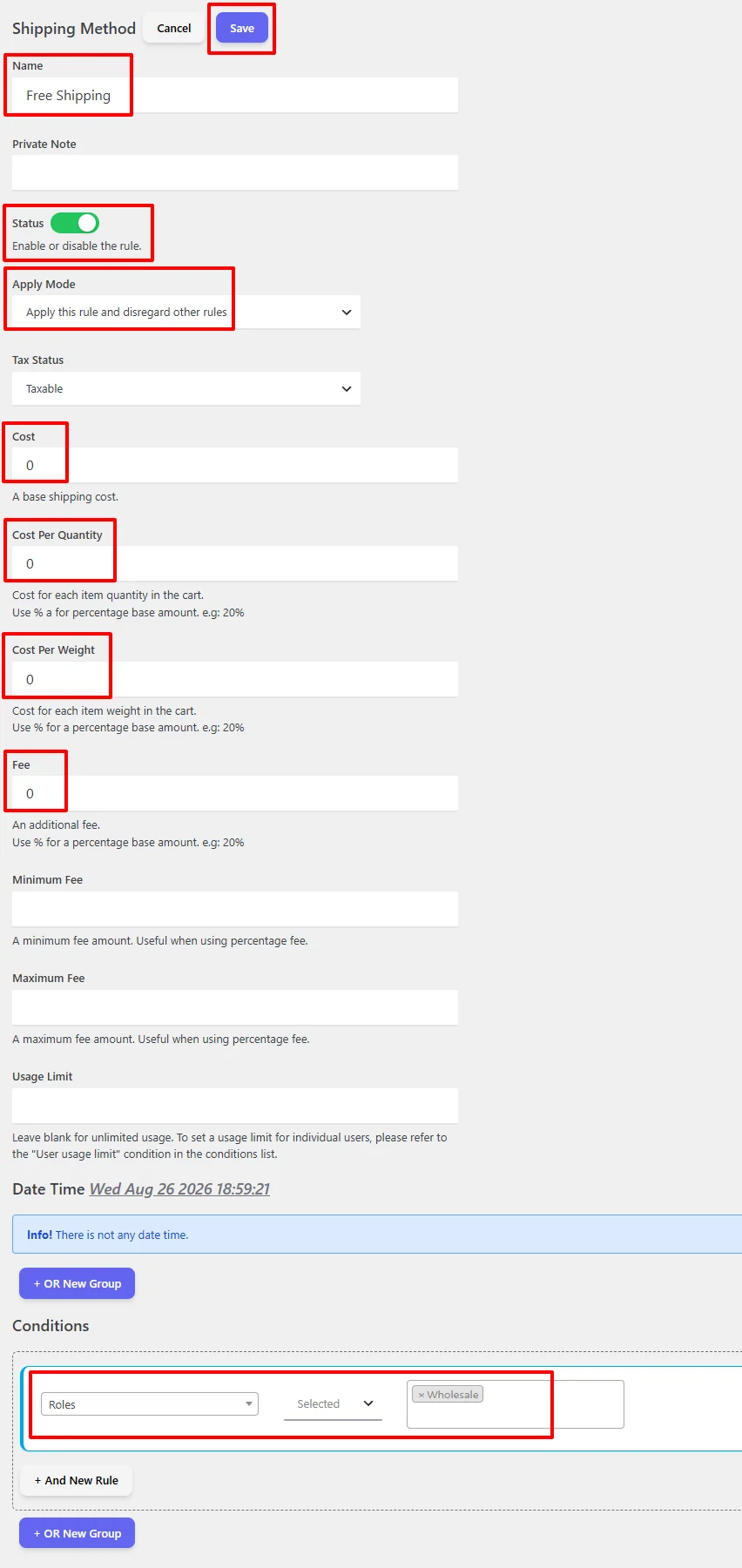
For scheduled promotions, under the "Date Time" section to configure:
- Date Range — Run a promotion over a period
- Date Time Range — Precise start and end date/time
- Specific Date — Single date activation
- Days — Recurring weekly promotions
- Time — Daily time ranges

Use "+ And New Rule" to combine conditions or "+ OR New Group" for alternative schedules.
For a deep dive into timezone setup, recurring schedules, and multi-tier scheduling logic, read our comprehensive Scheduling & Date-Time Guide.
Step 4: Set User Role Conditions
Under the Conditions section, set up the user role condition:
- Add "Roles" condition
- Select the user roles you want to offer free shipping to (e.g., Wholesale, VIP, Partner)
- You can select multiple user roles

Example: In our tutorial, we'll select the Wholesale user role.
💡 Common user roles for free shipping:
- Wholesale — For bulk buyers and B2B customers
- VIP Customer — For loyal, high-value customers
- Partner — For affiliate partners and resellers
- Retailer — For retail partners
For full details on all 14 condition groups, AND/OR logic, and available comparison operators, check out our Complete Rule Conditions Guide.
Step 5: Save and Test
Click Save and test by logging in with a user account that has the specified user role.
Result Example
Cart with Free Shipping for Wholesale Users
Cart items:
- Shirt: $20.00
- Shirt - Green: $25.00
Subtotal: $45.00
Result: Free shipping is automatically applied because the user is logged in with the Wholesale user role.
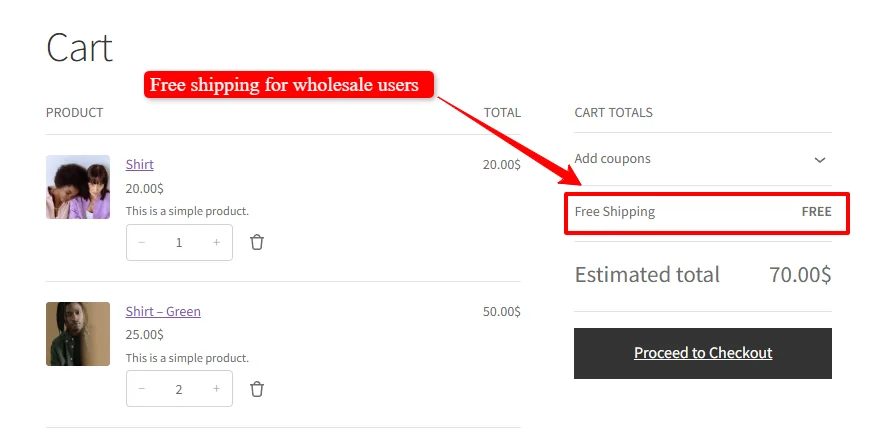
Cart display shows:
- Subtotal: $70.00
- Free Shipping: FREE
- Estimated total: $70.00
🚀 Troubleshooting: Free Shipping Not Showing?
If free shipping doesn't appear for users with the specified role, follow these steps:
Step 1: Check Your Conditions
- Verify that the "Roles" condition is added
- Ensure the correct user role is selected (e.g., Wholesale)
- Test with a user account that has the selected role
Step 2: Check User Role Assignment
- Go to Users > All Users in your WordPress admin
- Verify that the test user has the correct role assigned
- If not, edit the user and assign the appropriate role
Step 3: Check Other Shipping Methods
- If you have multiple shipping methods, ensure they're not conflicting
- Try setting Apply Mode to "Apply this rule and disregard other rules" to test
Step 4: Check for Plugin Conflicts
- Competing Shipping or Role Plugins: Third-party role-based pricing, B2B wholesale plugins, or competing free shipping plugins can intercept cart shipping filters or user role capability checks. Temporarily deactivate other shipping or discount plugins to test.
- Admin Screen Script Conflicts: If the rule editor fails to load, save, or show dropdowns, check your browser console (F12) for JavaScript errors caused by plugins enqueued globally across all admin screens (such as SkyVerge or analytics tools).
- Cart Caching: Ensure caching plugins exclude cart and checkout pages, and clear transients/cache before re-testing with role accounts.
- Learn More: For complete step-by-step conflict isolation instructions, see our Complete Troubleshooting Guide.
🎉 Success!
You've learned how to create free shipping for specific user roles in WooCommerce using the Discount Rules and Dynamic Pricing plugin. This powerful feature allows you to:
- Reward specific customer groups with exclusive free shipping
- Encourage wholesale orders by removing shipping costs for B2B customers
- Build customer loyalty by offering valuable perks to VIP members
- Schedule promotions for specific dates or recurring campaigns
📚 Next Steps
Now that you've mastered user role-based free shipping, explore other powerful ways to use the Shipping Methods features:
- Create Shipping Discounts — Apply percentage or fixed discounts on all or specific shipping methods.
- Create Free Shipping Threshold — Offer free shipping when customers reach a minimum cart subtotal.
- Create First Order Free Shipping — Encourage new buyers and increase signups with first-purchase free shipping.
- Create a Custom Shipping Method — Set up flat rate, conditional, or tiered custom shipping methods.
- Create Location-Based Shipping Methods — Configure dynamic shipping rates restricted by country, state, city, or postcode.
- Create Checkout Fees — Add conditional surcharges, handling fees, or payment method fees at checkout.
🔍 SEO Keywords
Primary Keywords: free shipping for user roles, wholesale free shipping WooCommerce, role based shipping, WooCommerce free shipping, free shipping for wholesale customers
Secondary Keywords: WooCommerce shipping methods, user role shipping, conditional free shipping, B2B free shipping, wholesale shipping, role based shipping methods, WooCommerce discount rules, dynamic pricing WooCommerce